Non-text content
The full wording for success criterion 1.1.1 Non-text content is quite long because it includes various exceptions. The key thing though, is:
All non-text content that is presented to the user has a text alternative that serves the equivalent purpose...
This page will go through some of the most common methods or techniques that you might use to meet this success criterion.
HTML
alt attribute on <img>
The easiest way of showing an image in a webpage is to use the <img> element. If you use this, you must have an alt attribute. If the image is meaningful, the value of the alt attribute should be the alt text. If the image is decorative, the alt attribute should be null.
<img src="filename.jpg" alt="Description of the image">
Here is an example:

<img src="Images/port-erin-beach.jpg" alt="Lady in a wheelchair on a beach">
If an image is decorative, the code should include a null alt attribute. This is not the same as not having an alt attribute.
<img src="filename.jpg" alt="">
ARIA
aria-label
If the image or non-text content is coded some other way, aria-label can be used to give the object a name, so that a screen reader announces it. This can be useful for things like <svg> elements. Let's look at an example of an icon. This one is often used to indicate a correct response to a quiz question.
<svg role="img" aria-label="Correct" xmlns="http://www.w3.org/2000/svg" viewBox="0 0 24 24" width="80" height="80" fill="none">
  <circle cx="12" cy="12" r="10" stroke="#6503A6" stroke-width="2"/>
  <path d="M7 12.5L10.5 16L17 9" stroke="#6503A6" stroke-width="2.5" stroke-linecap="round" stroke-linejoin="round"/>
</svg>
Note that this code also includes role="img". This ensures that a screen reader knows it is an image, as svg can be used for many purposes. A screen reader announces this image as Correct
.
aria-labelledby
Aria-labelledby works differently to aria-label. Instead of directly naming the object, you can use text that is already present somewhere else on the page and use that text as the accessible name.
This example shows a commonly used method of showing scores in a review of a product. The image is made up of five stars, but needs to be announced as one item. Using the aria-labelledby attribute with a value that matches an id attribute on the <span> element, means that a screen reader announces the contents of the <span> element for the group of stars.


I would give this product a score of 4 out of 5 because it is mostly great but has one small problem...
<div role="img" aria-labelledby="star-id" style="display: block; clear: left;">
  <img class="logo" src="Images/fullstar.png" alt="">
  <img class="logo" src="Images/fullstar.png" alt="">
  <img class="logo" src="Images/fullstar.png" alt="">
  <img class="logo" src="Images/fullstar.png" alt="">
  <img class="logo" src="Images/emptystar.png" alt="">
</div>
<p style="display: block; clear: left;">I would give this product a score of <span id="star-id">4 out of 5</span> because it is mostly great but has one small problem...</p>
aria-describedby
The final aria attribute we will look at is aria-describedby. This is useful because it supports multiple ids. It can be used to give information about a complex image, such as a diagram, chart or graph.
It works in a similar way to aria-labelledby. You give the text that you want announced for the image, an id. Each piece of text needs a different id. Then you can use those ids, separated by spaces as the value of the aria-describedby attribute.
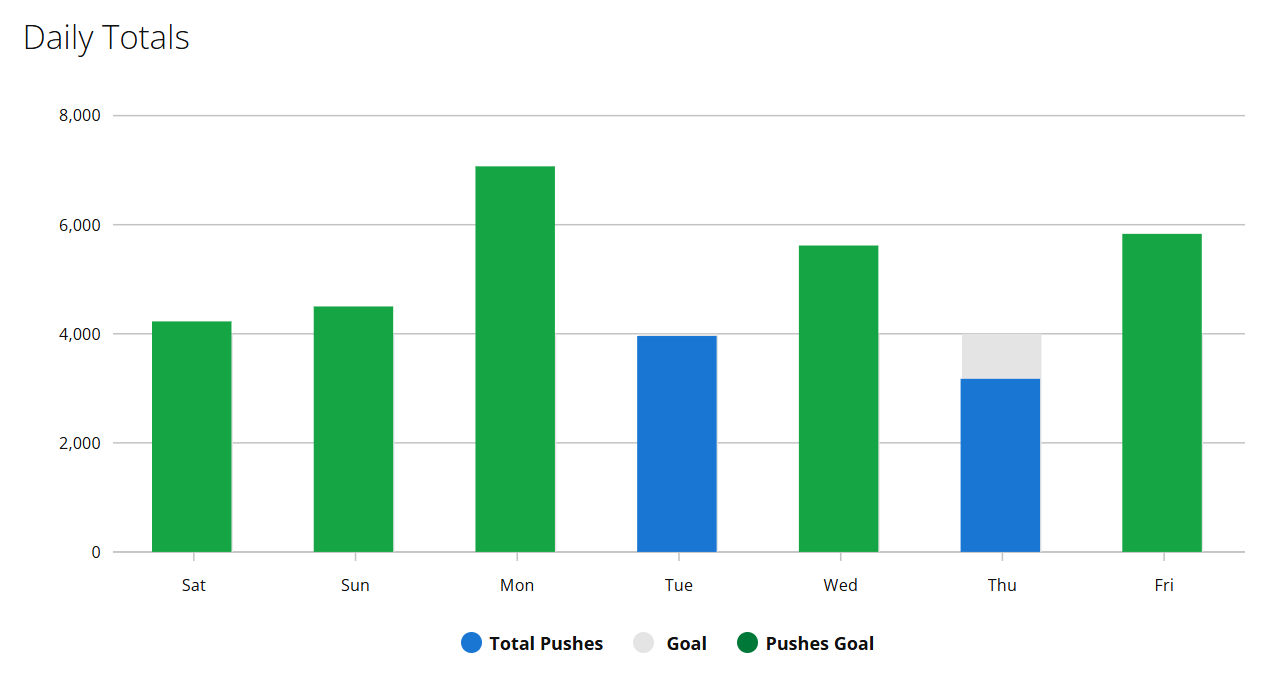
Let's look at an example. I took a screenshot of a graph from my Garmin app.
I'll put the code in next, to separate out the text that is associated with the image. However, I should point out, at this point, that screenreader support for this does vary. When I tested with JAWS, it didn't automatically read out the descriptions, but when I used the JAWS command: JAWS + Alt + R, it did read it out. Windows Narrator, on the other hand, did read out the description automatically. So this is just something to be aware of.
In reality, I would only use this if the required description was not near to the image in the DOM. It would be better for the description text to just follow the image.
<img src="Images/pushes.png" alt="Bar chart of the number of pushes I did on each day of the week." aria-describedby="context success failure">
<p id="context">I recently switched to a Garmin watch and I wanted to monitor my activity for a week. It measures wheelchair pushes rather than steps. I set a goal of 4,000 pushes per day.</p>
<p id="success">On five days, I exceeded my goal. On Saturday, I did 4,227 pushes. On Sunday, I did 4,501 pushes. On Monday, I went out for a longer walk, which resulted in 7,070 pushes for the day. On Wednesday, I did 5,618 pushes and on Friday, I did 5,832 pushes. I was really pleased with these days.</p>
<p id="failure">There were two days, when I didn't meet my target. On Tuesday, I work a much longer day and get less opportunity to exercise. I just missed my target, at 3,959 pushes. I was more disappointed with Thursday, when I only managed 3,174 pushes.</p>
I recently switched to a Garmin watch and I wanted to monitor my activity for a week. It measures wheelchair pushes rather than steps. I set a goal of 4,000 pushes per day.
On five days, I exceeded my goal. On Saturday, I did 4,227 pushes. On Sunday, I did 4,501 pushes. On Monday, I went out for a longer walk, which resulted in 7,070 pushes for the day. On Wednesday, I did 5,618 pushes and on Friday, I did 5,832 pushes. I was really pleased with these days.
There were two days, when I didn't meet my target. On Tuesday, I work a much longer day and get less opportunity to exercise. I just missed my target, at 3,959 pushes. I was more disappointed with Thursday, when I only managed 3,174 pushes.